> ## Documentation Index
> Fetch the complete documentation index at: https://docs.tamarind.bio/llms.txt
> Use this file to discover all available pages before exploring further.
# Protein Design Agent
> An autonomous agent that runs a de novo protein design campaign end to end
The Protein Design Agent is an autonomous agent that takes a design goal in plain language and runs a full de novo binder design campaign for you: finding the binding site, generating candidates, validating them, and returning a ranked shortlist ready for the lab.
Instead of picking tools, configuring settings, and chaining jobs together yourself, you describe the target and what you want. The agent plans the campaign, runs it, and keeps you in the loop at each decision point. It is the difference between operating the platform and delegating the whole design problem to it.
 ## When to use it
Reach for the agent when you have a design goal rather than a specific tool in mind, or when the campaign would otherwise be many manual steps.
* **De novo binders against a known target.** You have a target structure and want new binders against it, ideally at a specific functional site.
* **Epitope-targeted design.** You care about hitting a particular surface on the target (for example, to block a receptor interaction), not binding anywhere on it.
* **A ranked shortlist for the lab.** You want a manageable, prioritized panel to test rather than a raw pile of thousands of designs.
* **You are not sure which tool to use.** The agent selects and sequences the right methods for your target and format.
If you already know exactly which tool and settings you want, you can run that tool directly from the [dashboard](https://app.tamarind.bio) instead. See [Protein Design](/tasks/protein-design) for tool-by-tool recommendations.
## Starting a campaign
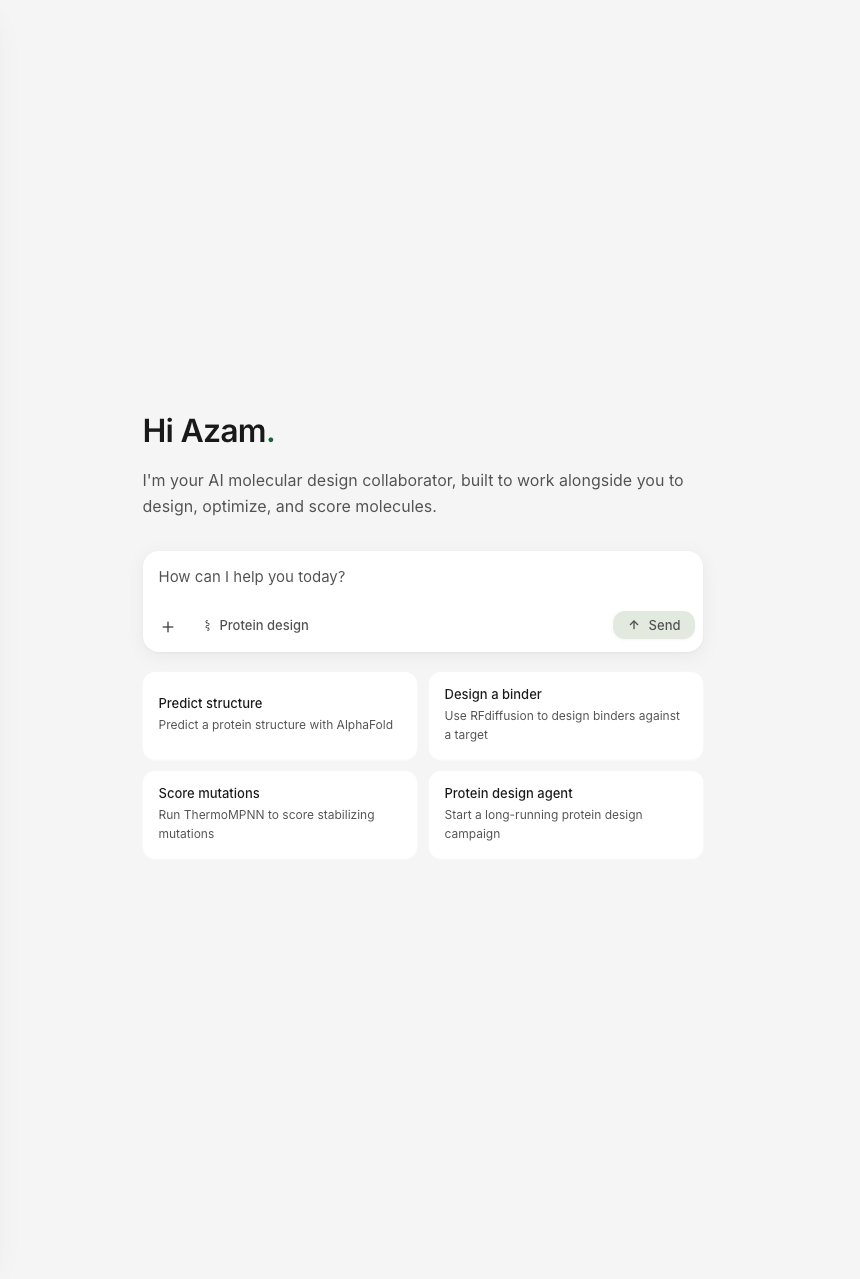
The agent lives inside the Tamarind [Assistant](https://app.tamarind.bio/assistant). Open the Assistant and choose **Protein design agent** to start a long-running campaign, then describe your goal in the chat.
## How a campaign works
A campaign moves through five stages. You describe your goal, confirm the plan, and the agent runs the rest on its own, pausing for your input at the points that matter.
### 1. Describe your goal
Describe your target and what you want in plain language, for example:
> Design de novo binders against the PD-1 binding face of human PD-L1 for competitive checkpoint blockade. I want about 32 candidates for the lab, and they should be developable.
The agent reads your goal and asks a few quick questions to set the campaign up sensibly:
* **What are your goals?** The target you are designing against, and what the binders should do (block a specific interaction, agonize a receptor, engage a particular epitope).
* **Design format.** Antibody, nanobody, miniprotein, or peptide.
* **Final panel size.** How many designs the lab-ready shortlist should contain (the default is about 32).
For large de novo runs it also offers a choice of scale: it can try a couple of binding-site and length options at low volume before committing to a full design round, or go straight to the top-ranked site after mapping. Once it has what it needs, it lays out its plan for you to confirm.
## When to use it
Reach for the agent when you have a design goal rather than a specific tool in mind, or when the campaign would otherwise be many manual steps.
* **De novo binders against a known target.** You have a target structure and want new binders against it, ideally at a specific functional site.
* **Epitope-targeted design.** You care about hitting a particular surface on the target (for example, to block a receptor interaction), not binding anywhere on it.
* **A ranked shortlist for the lab.** You want a manageable, prioritized panel to test rather than a raw pile of thousands of designs.
* **You are not sure which tool to use.** The agent selects and sequences the right methods for your target and format.
If you already know exactly which tool and settings you want, you can run that tool directly from the [dashboard](https://app.tamarind.bio) instead. See [Protein Design](/tasks/protein-design) for tool-by-tool recommendations.
## Starting a campaign
The agent lives inside the Tamarind [Assistant](https://app.tamarind.bio/assistant). Open the Assistant and choose **Protein design agent** to start a long-running campaign, then describe your goal in the chat.
## How a campaign works
A campaign moves through five stages. You describe your goal, confirm the plan, and the agent runs the rest on its own, pausing for your input at the points that matter.
### 1. Describe your goal
Describe your target and what you want in plain language, for example:
> Design de novo binders against the PD-1 binding face of human PD-L1 for competitive checkpoint blockade. I want about 32 candidates for the lab, and they should be developable.
The agent reads your goal and asks a few quick questions to set the campaign up sensibly:
* **What are your goals?** The target you are designing against, and what the binders should do (block a specific interaction, agonize a receptor, engage a particular epitope).
* **Design format.** Antibody, nanobody, miniprotein, or peptide.
* **Final panel size.** How many designs the lab-ready shortlist should contain (the default is about 32).
For large de novo runs it also offers a choice of scale: it can try a couple of binding-site and length options at low volume before committing to a full design round, or go straight to the top-ranked site after mapping. Once it has what it needs, it lays out its plan for you to confirm.
 ### 2. Find the binding site
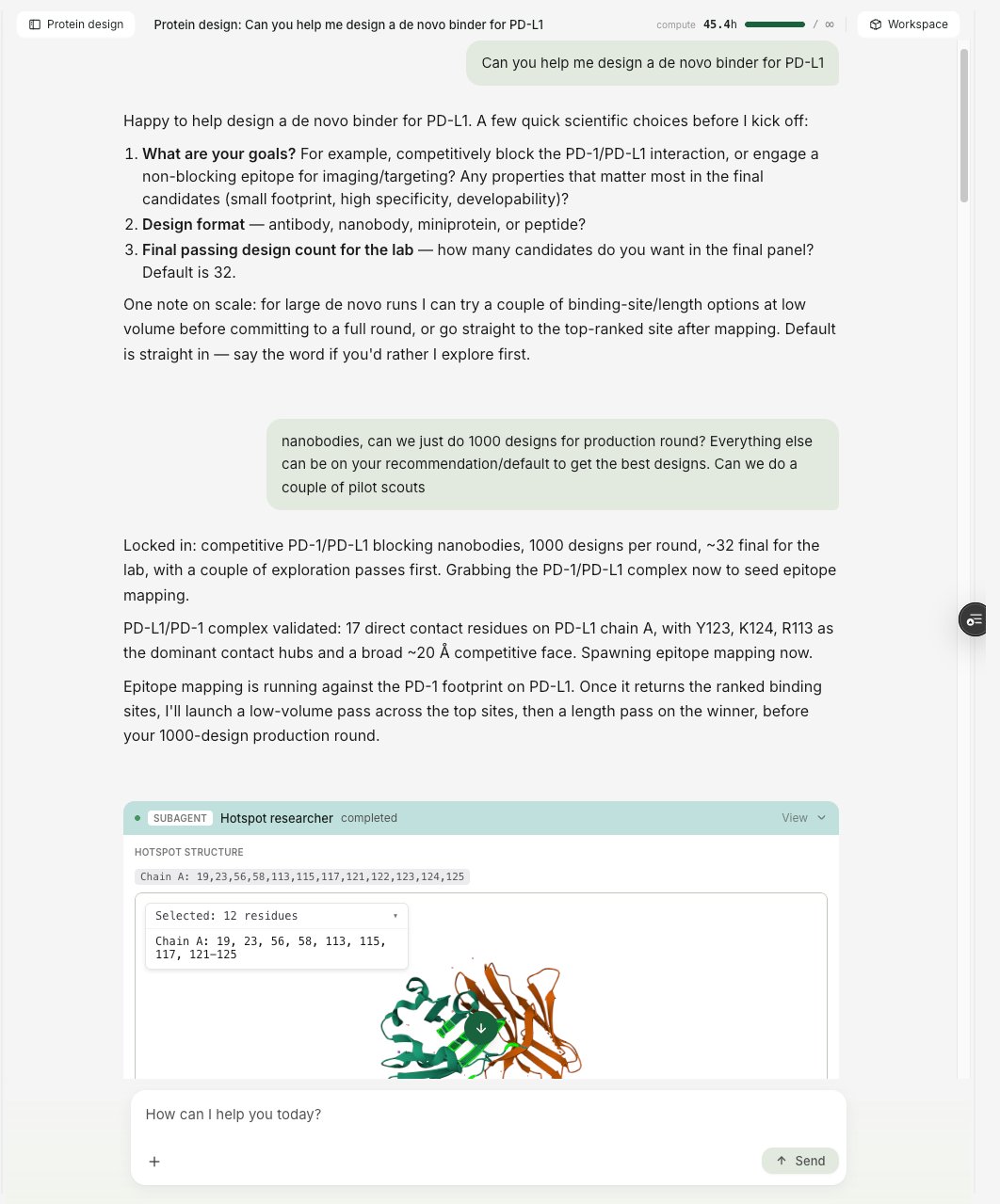
The agent maps the target's surface directly from its structure. It reads the residues the natural partner contacts at the interface, groups them into candidate patches, and identifies the epitope your binders should engage. Because this is grounded in the actual structure and known interfaces rather than guessed, the campaign aims at the region that drives your mechanism (for a competitive blocker, the surface the natural partner binds) instead of an arbitrary patch.
It also uses this map to keep designs honest: each design run is pointed at a compact, well-defined site and filtered to reward designs that actually contact it. Spreading a binder across too broad a surface produces designs that engage the target weakly, so a tightly-scoped site gives better candidates. If you already know the epitope you want, you can name it and the agent targets it; if not, it proposes one and explains the choice.
### 2. Find the binding site
The agent maps the target's surface directly from its structure. It reads the residues the natural partner contacts at the interface, groups them into candidate patches, and identifies the epitope your binders should engage. Because this is grounded in the actual structure and known interfaces rather than guessed, the campaign aims at the region that drives your mechanism (for a competitive blocker, the surface the natural partner binds) instead of an arbitrary patch.
It also uses this map to keep designs honest: each design run is pointed at a compact, well-defined site and filtered to reward designs that actually contact it. Spreading a binder across too broad a surface produces designs that engage the target weakly, so a tightly-scoped site gives better candidates. If you already know the epitope you want, you can name it and the agent targets it; if not, it proposes one and explains the choice.
 ### 3. Design candidates
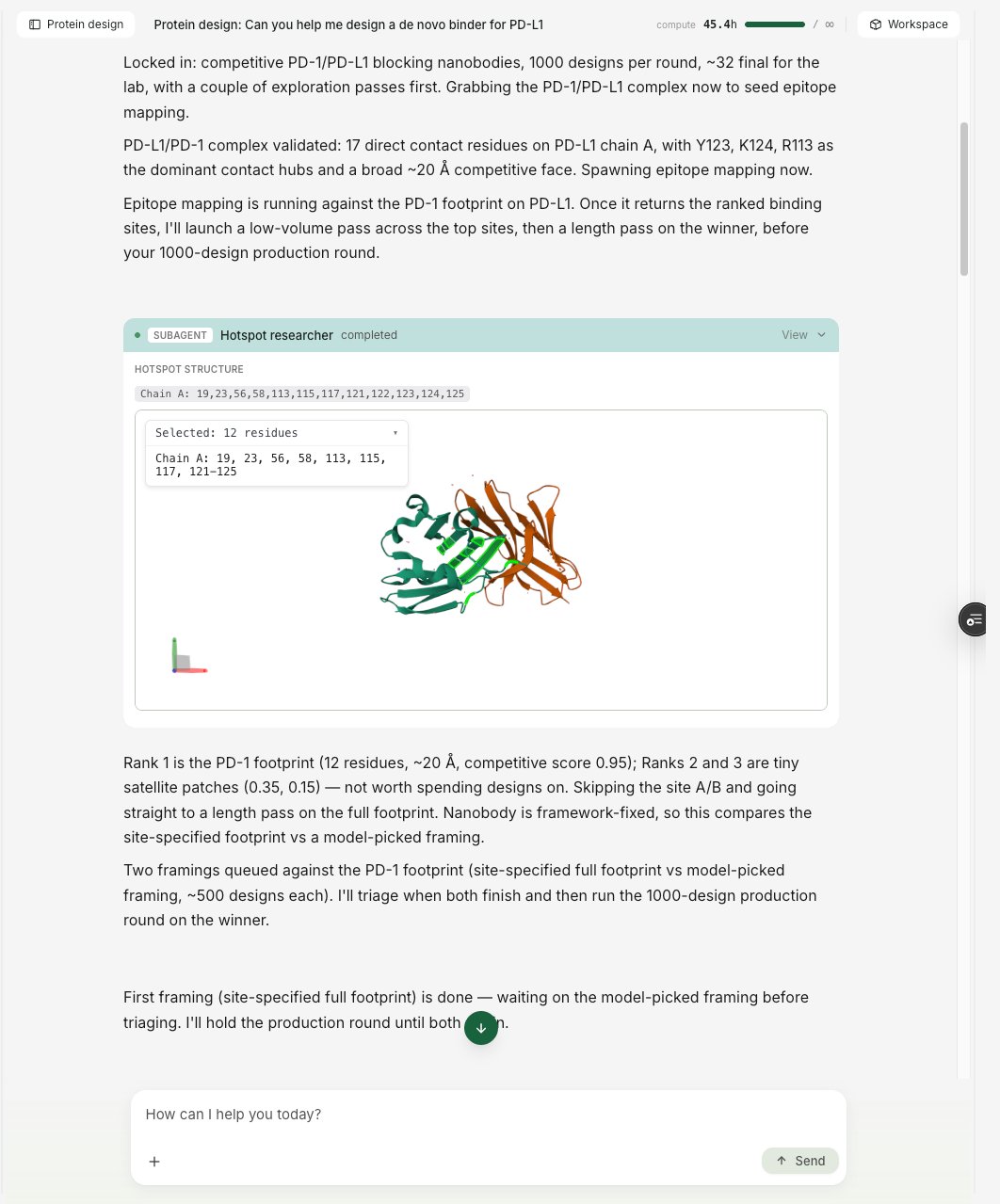
The agent generates binders against the chosen site, picking a design method suited to your format automatically, so you get an approach appropriate to a miniprotein, nanobody, antibody, or peptide without selecting it yourself.
For large runs it does not gamble the whole budget on one approach. It first runs a small pilot across a few options (for example, different binding sites or binder lengths), compares how each performs on the pilot results, and then scales up only the approach that looks best. This keeps a campaign from spending a large, expensive round on a framing that was never going to work, and it means the final production run is aimed at the setup the pilot already showed is promising.
### 4. Validate the designs
Generating a design is not the same as trusting it, so the agent validates before anything reaches your shortlist.
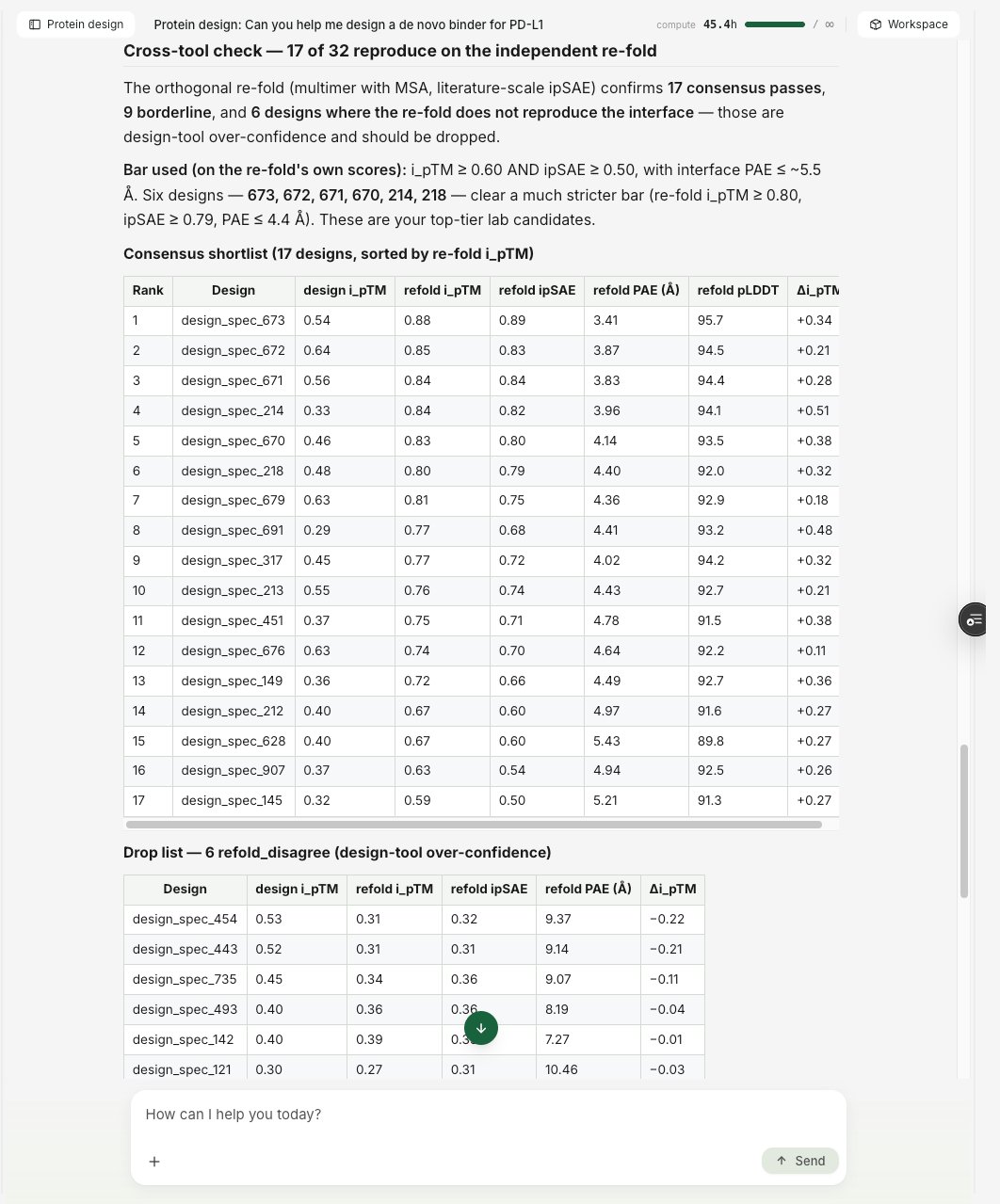
The core check is an **independent re-fold**. The agent takes its top candidates and re-predicts each one from sequence with a separate structure-prediction model (AlphaFold-multimer, with a multiple-sequence alignment), distinct from the model used to design them. If the designed interface holds up under this independent second opinion, the candidate is corroborated; if the interface does not reproduce, it is set aside. Using a genuinely different model matters: re-scoring a design with a close relative of the model that made it tends to agree with itself, so the second opinion has to come from a different lineage to be worth anything.
On top of that it screens for **developability** and quality: it reasons about liabilities like free (unpaired, solvent-exposed) cysteines, aggregation-prone patches, and other composition flags in the context of the predicted structure, rather than blanket-penalizing a residue on sight. A candidate that looks good on paper but would be hard to express or manufacture does not reach the shortlist.
### 3. Design candidates
The agent generates binders against the chosen site, picking a design method suited to your format automatically, so you get an approach appropriate to a miniprotein, nanobody, antibody, or peptide without selecting it yourself.
For large runs it does not gamble the whole budget on one approach. It first runs a small pilot across a few options (for example, different binding sites or binder lengths), compares how each performs on the pilot results, and then scales up only the approach that looks best. This keeps a campaign from spending a large, expensive round on a framing that was never going to work, and it means the final production run is aimed at the setup the pilot already showed is promising.
### 4. Validate the designs
Generating a design is not the same as trusting it, so the agent validates before anything reaches your shortlist.
The core check is an **independent re-fold**. The agent takes its top candidates and re-predicts each one from sequence with a separate structure-prediction model (AlphaFold-multimer, with a multiple-sequence alignment), distinct from the model used to design them. If the designed interface holds up under this independent second opinion, the candidate is corroborated; if the interface does not reproduce, it is set aside. Using a genuinely different model matters: re-scoring a design with a close relative of the model that made it tends to agree with itself, so the second opinion has to come from a different lineage to be worth anything.
On top of that it screens for **developability** and quality: it reasons about liabilities like free (unpaired, solvent-exposed) cysteines, aggregation-prone patches, and other composition flags in the context of the predicted structure, rather than blanket-penalizing a residue on sight. A candidate that looks good on paper but would be hard to express or manufacture does not reach the shortlist.
 ### 5. Review the ranked shortlist
At the end you get a lab-ready panel: the best candidates, ranked, sized to the number you asked for. Each candidate comes with its predicted structure, interface metrics, and a short note on why it made the cut. This is a prioritized set to take into the lab, so you can test the most promising designs first.
### 5. Review the ranked shortlist
At the end you get a lab-ready panel: the best candidates, ranked, sized to the number you asked for. Each candidate comes with its predicted structure, interface metrics, and a short note on why it made the cut. This is a prioritized set to take into the lab, so you can test the most promising designs first.
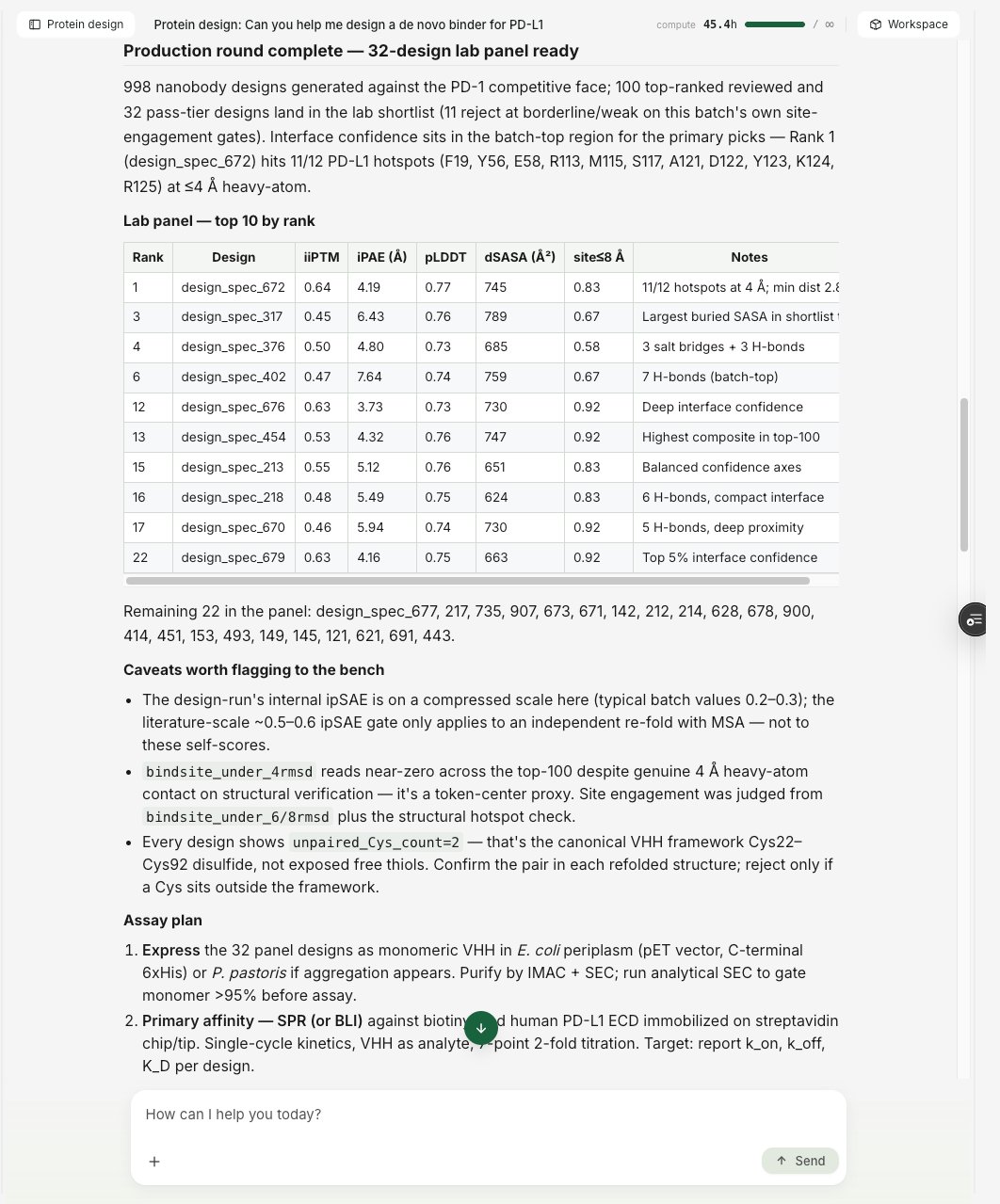 In-silico scores rank and enrich candidates. They prioritize which designs to test first; they are not a prediction of experimental binding affinity. We recommend validating a shortlist experimentally.
## Staying in control
The agent runs autonomously, but you are never locked out of it.
* **You confirm the plan before it starts.** Nothing runs until you approve the approach.
* **It pauses at decision points.** After it has evaluated a round of designs, the campaign pauses and asks you how to proceed, so you can accept the shortlist, change the goal, or approve another round before anything else runs.
* **You can interrupt at any time.** Stop a running campaign to redirect it or ask a question; designs already submitted finish on their own, and you can pick the campaign back up afterward.
* **You can watch it work.** The campaign view shows progress live: the binding sites it found, the designs it generated, and the candidates it shortlisted.
## Supported formats
The agent designs across the common binder formats. It picks a design approach suited to the format you ask for.
* **Miniproteins** (small de novo protein binders)
* **Nanobodies** (single-domain VHH)
* **Antibodies** (de novo)
* **Peptides**
## Compute and cost
A campaign runs real design and structure-prediction jobs under your own account, so they appear in your [dashboard](https://app.tamarind.bio) and count toward your compute hours like any other job. A full design round is a heavy compute run, so the agent tells you before it starts one. Each campaign shows its running compute total, and you can set a compute-hour cap to bound how much it spends. See [Compute Hours](/support/compute-hours) for how usage is measured.
## Frequently asked questions
**How is this different from running the tools myself?**
Running a tool yourself means choosing the tool, configuring settings, submitting jobs, reading the outputs, and deciding what to do next, for every step. The agent does that loop for you: it selects the methods, sets them up, runs them, reads the results, and decides the next move, checking in with you at the decision points. You can still run any tool directly whenever you prefer.
**Do I need a target structure?**
A target structure is the ideal starting point. If you have one, provide it. The agent works from the target and the site you want to engage.
**Can I steer which part of the target it designs against?**
Yes. If you have a specific epitope or functional site in mind, say so in your goal, and the agent will target it. If you do not, it will identify a site for you and explain its choice.
**How many candidates do I get?**
You tell the agent how many you want for the lab, and it sizes the final shortlist to that number, returning the best candidates it found, ranked.
**Will the designs bind?**
The agent returns the candidates most likely to be worth testing, ranked by the available in-silico evidence. No in-silico method predicts experimental binding with certainty, so the shortlist is a prioritized set for the lab, not a guarantee. Testing the top candidates is the next step.
## Getting started
The Protein Design Agent is being rolled out to select organizations. If you would like access, reach out at [info@tamarind.bio](mailto:info@tamarind.bio).
In-silico scores rank and enrich candidates. They prioritize which designs to test first; they are not a prediction of experimental binding affinity. We recommend validating a shortlist experimentally.
## Staying in control
The agent runs autonomously, but you are never locked out of it.
* **You confirm the plan before it starts.** Nothing runs until you approve the approach.
* **It pauses at decision points.** After it has evaluated a round of designs, the campaign pauses and asks you how to proceed, so you can accept the shortlist, change the goal, or approve another round before anything else runs.
* **You can interrupt at any time.** Stop a running campaign to redirect it or ask a question; designs already submitted finish on their own, and you can pick the campaign back up afterward.
* **You can watch it work.** The campaign view shows progress live: the binding sites it found, the designs it generated, and the candidates it shortlisted.
## Supported formats
The agent designs across the common binder formats. It picks a design approach suited to the format you ask for.
* **Miniproteins** (small de novo protein binders)
* **Nanobodies** (single-domain VHH)
* **Antibodies** (de novo)
* **Peptides**
## Compute and cost
A campaign runs real design and structure-prediction jobs under your own account, so they appear in your [dashboard](https://app.tamarind.bio) and count toward your compute hours like any other job. A full design round is a heavy compute run, so the agent tells you before it starts one. Each campaign shows its running compute total, and you can set a compute-hour cap to bound how much it spends. See [Compute Hours](/support/compute-hours) for how usage is measured.
## Frequently asked questions
**How is this different from running the tools myself?**
Running a tool yourself means choosing the tool, configuring settings, submitting jobs, reading the outputs, and deciding what to do next, for every step. The agent does that loop for you: it selects the methods, sets them up, runs them, reads the results, and decides the next move, checking in with you at the decision points. You can still run any tool directly whenever you prefer.
**Do I need a target structure?**
A target structure is the ideal starting point. If you have one, provide it. The agent works from the target and the site you want to engage.
**Can I steer which part of the target it designs against?**
Yes. If you have a specific epitope or functional site in mind, say so in your goal, and the agent will target it. If you do not, it will identify a site for you and explain its choice.
**How many candidates do I get?**
You tell the agent how many you want for the lab, and it sizes the final shortlist to that number, returning the best candidates it found, ranked.
**Will the designs bind?**
The agent returns the candidates most likely to be worth testing, ranked by the available in-silico evidence. No in-silico method predicts experimental binding with certainty, so the shortlist is a prioritized set for the lab, not a guarantee. Testing the top candidates is the next step.
## Getting started
The Protein Design Agent is being rolled out to select organizations. If you would like access, reach out at [info@tamarind.bio](mailto:info@tamarind.bio).